Prepaid Expense Amortization Schedule & Month-End Rollforward Workpaper Excel Template (US GAAP)
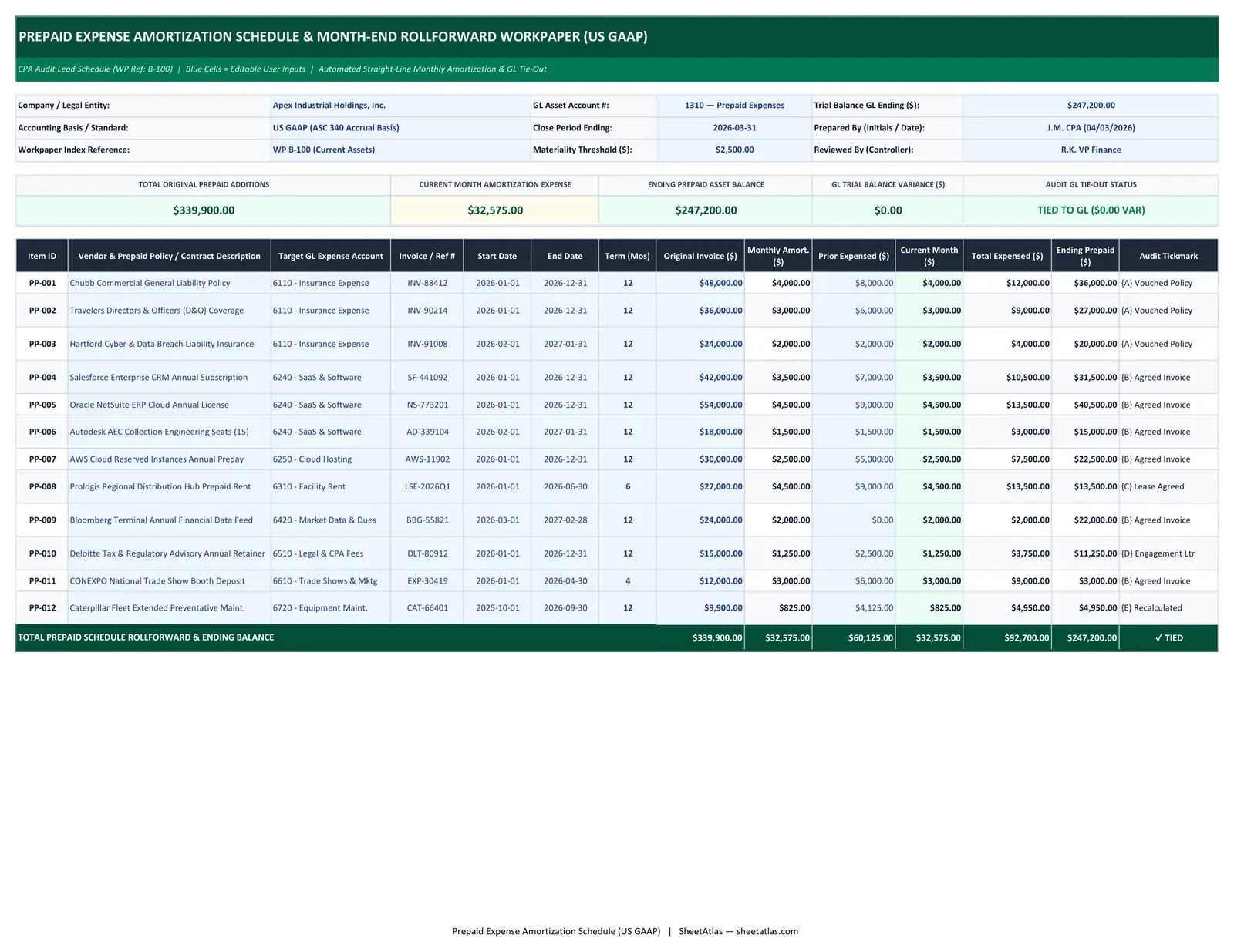
01_Prepaid_Amortization_Lead — Interactive Spreadsheet
| # | A | B | C | D | E | F | G | H | I | J | K | L | M | N |
|---|---|---|---|---|---|---|---|---|---|---|---|---|---|---|
| 1 | PREPAID EXPENSE AMORTIZATION SCHEDULE & MONTH-END ROLLFORWARD WORKPAPER (US GAAP) | |||||||||||||
| 2 | CPA Audit Lead Schedule (WP Ref: B-100) | Blue Cells = Editable User Inputs | Automated Straight-Line Monthly Amortization & GL Tie-Out | |||||||||||||
| 3 | ||||||||||||||
| 4 | Company / Legal Entity: | Apex Industrial Holdings, Inc. | GL Asset Account #: | 1310 — Prepaid Expenses | Trial Balance GL Ending ($): | |||||||||
| 5 | Accounting Basis / Standard: | US GAAP (ASC 340 Accrual Basis) | Close Period Ending: | 2026-03-31 | Prepared By (Initials / Date): | J.M. CPA (04/03/2026) | ||||||||
| 6 | Workpaper Index Reference: | WP B-100 (Current Assets) | Materiality Threshold ($): | Reviewed By (Controller): | R.K. VP Finance | |||||||||
| 7 | ||||||||||||||
| 8 | TOTAL ORIGINAL PREPAID ADDITIONS | CURRENT MONTH AMORTIZATION EXPENSE | ENDING PREPAID ASSET BALANCE | GL TRIAL BALANCE VARIANCE ($) | AUDIT GL TIE-OUT STATUS | |||||||||
| 9 | $0.00 | $0.00 | $0.00 | $0.00 | 0 | |||||||||
| 10 | ||||||||||||||
| 11 | Item ID | Vendor & Prepaid Policy / Contract Description | Target GL Expense Account | Invoice / Ref # | Start Date | End Date | Term (Mos) | Original Invoice ($) | Monthly Amort. ($) | Prior Expensed ($) | Current Month ($) | Total Expensed ($) | Ending Prepaid ($) | Audit Tickmark |
| 12 | PP-001 | Chubb Commercial General Liability Policy | 6110 - Insurance Expense | INV-88412 | 2026-01-01 | 2026-12-31 | $0.00 | $0.00 | $0.00 | $0.00 | {A} Vouched Policy | |||
| 13 | PP-002 | Travelers Directors & Officers (D&O) Coverage | 6110 - Insurance Expense | INV-90214 | 2026-01-01 | 2026-12-31 | $0.00 | $0.00 | $0.00 | $0.00 | {A} Vouched Policy | |||
| 14 | PP-003 | Hartford Cyber & Data Breach Liability Insurance | 6110 - Insurance Expense | INV-91008 | 2026-02-01 | 2027-01-31 | $0.00 | $0.00 | $0.00 | $0.00 | {A} Vouched Policy | |||
| 15 | PP-004 | Salesforce Enterprise CRM Annual Subscription | 6240 - SaaS & Software | SF-441092 | 2026-01-01 | 2026-12-31 | $0.00 | $0.00 | $0.00 | $0.00 | {B} Agreed Invoice | |||
| 16 | PP-005 | Oracle NetSuite ERP Cloud Annual License | 6240 - SaaS & Software | NS-773201 | 2026-01-01 | 2026-12-31 | $0.00 | $0.00 | $0.00 | $0.00 | {B} Agreed Invoice | |||
| 17 | PP-006 | Autodesk AEC Collection Engineering Seats (15) | 6240 - SaaS & Software | AD-339104 | 2026-02-01 | 2027-01-31 | $0.00 | $0.00 | $0.00 | $0.00 | {B} Agreed Invoice | |||
| 18 | PP-007 | AWS Cloud Reserved Instances Annual Prepay | 6250 - Cloud Hosting | AWS-11902 | 2026-01-01 | 2026-12-31 | $0.00 | $0.00 | $0.00 | $0.00 | {B} Agreed Invoice | |||
| 19 | PP-008 | Prologis Regional Distribution Hub Prepaid Rent | 6310 - Facility Rent | LSE-2026Q1 | 2026-01-01 | 2026-06-30 | $0.00 | $0.00 | $0.00 | $0.00 | {C} Lease Agreed | |||
| 20 | PP-009 | Bloomberg Terminal Annual Financial Data Feed | 6420 - Market Data & Dues | BBG-55821 | 2026-03-01 | 2027-02-28 | $0.00 | $0.00 | $0.00 | $0.00 | {B} Agreed Invoice | |||
| 21 | PP-010 | Deloitte Tax & Regulatory Advisory Annual Retainer | 6510 - Legal & CPA Fees | DLT-80912 | 2026-01-01 | 2026-12-31 | $0.00 | $0.00 | $0.00 | $0.00 | {D} Engagement Ltr | |||
| 22 | PP-011 | CONEXPO National Trade Show Booth Deposit | 6610 - Trade Shows & Mktg | EXP-30419 | 2026-01-01 | 2026-04-30 | $0.00 | $0.00 | $0.00 | $0.00 | {B} Agreed Invoice | |||
| 23 | PP-012 | Caterpillar Fleet Extended Preventative Maint. | 6720 - Equipment Maint. | CAT-66401 | 2025-10-01 | 2026-09-30 | $0.00 | $0.00 | $0.00 | $0.00 | {E} Recalculated | |||
| 24 | TOTAL PREPAID SCHEDULE ROLLFORWARD & ENDING BALANCE | $0.00 | $0.00 | $0.00 | $0.00 | $0.00 | $0.00 | 0 | ||||||
Free Instant Download
No email signup • Unlocked formulas
Built-In Excel Formulas & Calculation Logic
Unlocked native Microsoft Excel functions pre-programmed inside this workbook:
=IFERROR(ROUND(H12/G12, 2), 0) Divides the original prepaid invoice cost basis (Column H) by the service coverage term in months (Column G), rounding to two decimal places to prevent fractional cent drift.
=MAX(0, MIN(I12, H12-J12)) Recognizes the standard monthly amortization amount while capping recognition at the remaining unamortized balance (Original Cost minus Prior Expensed) so no prepaid asset ever amortizes below $0.00.
=IF(ABS(M24-L4)<0.01, "TIED TO GL ($0.00 VAR)", "RECONCILE VARIANCE") Compares the sum of ending prepaid asset balances on the schedule (Cell M24) against the General Ledger Account 1310 Trial Balance ending balance (Cell L4) and flags any discrepancy exceeding one cent.
=SUMIF('01_Prepaid_Amortization_Lead'!$C$12:$C$23, B5, '01_Prepaid_Amortization_Lead'!$K$12:$K$23) Dynamically sums current-month amortization across all prepaid policies mapped to each specific P&L expense account (Insurance, SaaS, Cloud Hosting, Rent, Legal) to build a balanced month-end journal entry.
Full Workbook Print Layout Preview (.XLSX)
Overview & Industry Standard Alignment
During the monthly financial close and annual external audit, Prepaid Expenses (GL Account 1310) is one of the first balance sheet accounts scrutinized by controllers and CPA auditors. Tracking annual SaaS contracts, commercial insurance binders, and advance rent payments on ad-hoc spreadsheets without automated balance caps frequently leads to over-amortized negative balances and reconciliation variances against the Trial Balance. This Prepaid Expense Amortization Schedule & Month-End Rollforward Workpaper (.xlsx) is structured to Big-4 audit workpaper standards. It features a formal workpaper sign-off header (Entity, GL Account, Close Period, Materiality Threshold, Preparer/Reviewer initials), 5 executive KPI cards with live GL tie-out status, a line-by-line rollforward schedule with cap-protected formulas, an automated Month-End Journal Entry tab grouped by P&L expense code, and a US GAAP policy & audit tickmark legend.
Practical Operational Use Cases:
Monthly Corporate Accounting Close (Day 1–3 Close)
Calculate monthly prepaid expense relief in seconds and export a balanced Debit/Credit journal entry directly into NetSuite, QuickBooks Online, Sage Intacct, or Xero.
External Financial Statement Audit Preparation (PBC Workpaper)
Deliver a clean, self-reconciling Prepared-by-Client (PBC) lead schedule with invoice numbers, service dates, audit tickmarks, and zero variance to the General Ledger.
Annual SaaS & Software Spend Tracking
Monitor enterprise annual software prepayments (Salesforce, NetSuite, AWS Reserved Instances, Autodesk) and track exact renewal dates before auto-renewal windows close.
Commercial Insurance Portfolio Amortization
Amortize General Liability, D&O, Cyber, Workers' Compensation, and Umbrella policy premiums accurately across fiscal years.
Designed For:
What’s Inside the Workbook (Tab-by-Tab Breakdown)
01_Prepaid_Amortization_Lead (CPA Lead Schedule & GL Tie-Out)
Complete audit workpaper featuring a CPA control header, 5 live KPI summary cards (Total Original Additions, Current Month Amortization, Ending Prepaid Asset Balance, GL Variance $, and Tie-Out Status), and a 14-column rollforward schedule.
02_Month_End_Journal_Entries (Auto-Generated ERP Journal Entry)
Automated Debit/Credit journal entry table that uses SUMIF formulas to group current-period amortization by target P&L GL account (6110 Insurance, 6240 SaaS, 6250 Cloud, 6310 Rent, etc.) and credits 1310 Prepaid Expenses with a built-in Dr = Cr check.
03_GAAP_Policy_and_Tickmarks (Capitalization Policy & Audit Legend)
Standardized CPA audit tickmark reference ({A} through {E}) and corporate de minimis capitalization threshold documentation ($2,500 policy benchmark).
Practitioner Tips & Best Practices
-
✓
Establish a Clear De Minimis Capitalization Threshold: Avoid cluttering your prepaid schedule with minor $150 software renewals. Set a formal accounting policy threshold (e.g., $2,500 or $5,000) below which prepaid invoices are expensed immediately upon receipt.
-
✓
Always Cap Monthly Amortization at Remaining Unamortized Cost: Using =MAX(0, MIN(Monthly_Amort, Original_Cost - Prior_Expensed)) guarantees that rounding differences in the final month of a 12-month contract never push the ending prepaid balance negative.
-
✓
Reconcile Schedule Additions to GL Account 1310 Debits Monthly: Before finalizing the monthly journal entry, compare new rows added to Tab 01 against all AP invoices coded to GL 1310 during the month to ensure no new prepayment was missed.
-
✓
Retain Fully Amortized Items Until Fiscal Year-End Audit Completion: Keep contracts that reach a $0.00 ending balance during the fiscal year visible on the schedule until the external audit is signed off so cumulative P&L expense ties to the income statement.
Frequently Asked Questions
How do you calculate monthly prepaid expense amortization in Excel?
Under the straight-line method required by US GAAP, divide the total prepaid invoice amount by the number of months in the coverage period using =ROUND(Original_Amount / Term_Months, 2), and cap each month's recognition at the remaining unamortized balance using =MAX(0, MIN(Monthly_Rate, Remaining_Balance)).
What is the standard month-end journal entry for prepaid expense amortization?
To record monthly amortization, you Debit the applicable income statement expense account (such as 6110 Insurance Expense or 6240 SaaS Software Expense) and Credit the balance sheet asset account (1310 Prepaid Expenses). Tab 02 of this workbook generates this exact entry automatically.
How do you handle partial-month proration for policies starting mid-month?
Companies typically adopt one of two GAAP conventions: the Half-Month / Full-Month convention (contracts starting between the 1st and 15th receive a full month of amortization in month one; after the 15th they begin the following month) or exact daily proration based on days active.
Why does my prepaid schedule have a $0.04 rounding difference in Month 12?
When an invoice amount is not evenly divisible by 12 (for example, $10,000 / 12 = $833.333...), 11 months of $833.33 leave $833.37 for the 12th month. Our formula automatically adjusts the final period so cumulative amortization equals 100% of the invoice.
Should multi-year prepaid contracts be split between Current and Non-Current Assets?
Yes. Under US GAAP (ASC 210), the portion of a prepaid contract that will be amortized within the next 12 months is classified as a Current Asset (Prepaid Expenses), while any balance amortizing beyond 12 months should be classified as a Non-Current / Other Long-Term Asset.
Can I add custom GL expense accounts to this Excel workpaper?
Yes. All cells and formulas are 100% unlocked. Simply type your company's exact GL account numbers and names into Column C on Tab 01 and Column B on Tab 02, and the SUMIF journal entry formulas will update automatically.